bgx: BackGround eXecute
In GitHub Actions, steps inside a job run sequentially. Normally, you would achieve parallelism by running multiple jobs at once, but they run on different runners and you get charged more minutes. But some commands within a job are independent and could run in parallel. This has led me to build bgx while optimizing a GitHub Actions workflow.
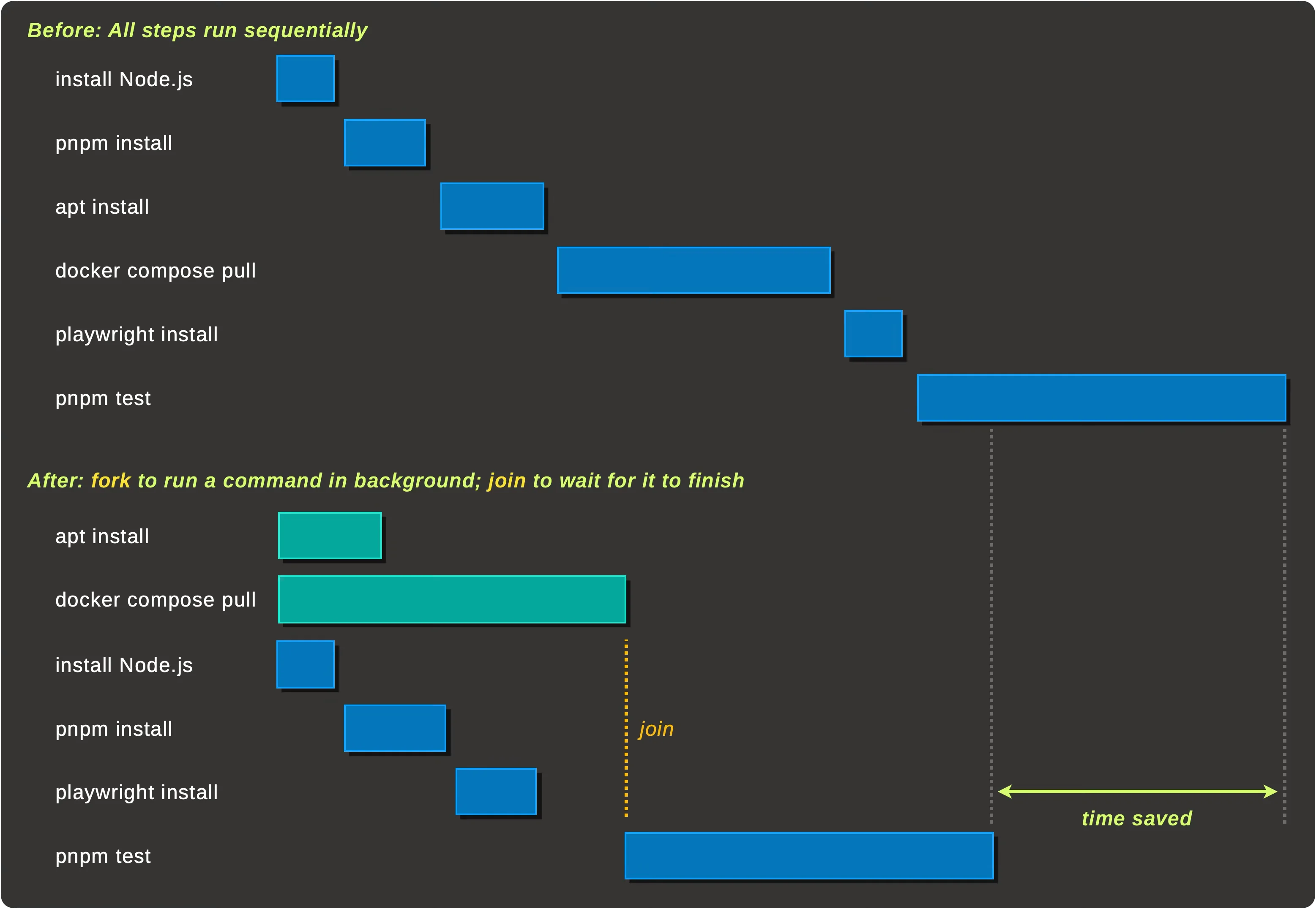
bgx is a CI-agnostic tool that lets you fork a command into the background, keep doing other work, then join on it later to stream its output and get its exit code.
In June 2026, GitHub Actions steps can now run in parallel, which is native support for the same use case bgx was built for. bgx still works fine outside GitHub Actions and comes with a few extra features.
It provides 2 main commands:
bgx fork— detaches a command into the background and records its output, resource usage, and exit code into the shared databasebgx join— replays events from the database, streaming stdout/stderr live, and exits with the command's exit code
And it can be used like this:
- name: Pull Docker images in background
  run: bgx fork --task-name images -- docker compose pull

- name: Install ffmpeg in background
  run: bgx fork --task-name ffmpeg -- sudo apt-get install -y ffmpeg

- name: Install deps and build
  run: npm ci && npm run build

- name: Wait for background tasks
  run: bgx join --task-name images --task-name ffmpeg

- name: Run integration tests
  run: npm run test:integration
Other features include:
- Cross-platform (Linux, macOS, Windows)
- Real-time output streaming with task name tagging
- GitHub Actions integration with collapsible group support
- CPU/memory heartbeat monitoring (Linux only)
- All data is backed by a single shared SQLite database, so there are no per-task log files to juggle.
- Tasks are recorded as rows in an
eventstable (task name, event type, timestamps, output, PID, command, exit code, resource metrics), so you can inspect a run after the fact - Easily installable via mise