When developing a service locally which integrates with external services through webhooks, it is often necessary to expose the local server to the internet. Usually one would use ngrok or Cloudflare Quick Tunnels, but the URL changes every time the tunnel is restarted. It would be more convenient to have a stable subdomain for the local server. This is my current setup using frp (fast reverse proxy):
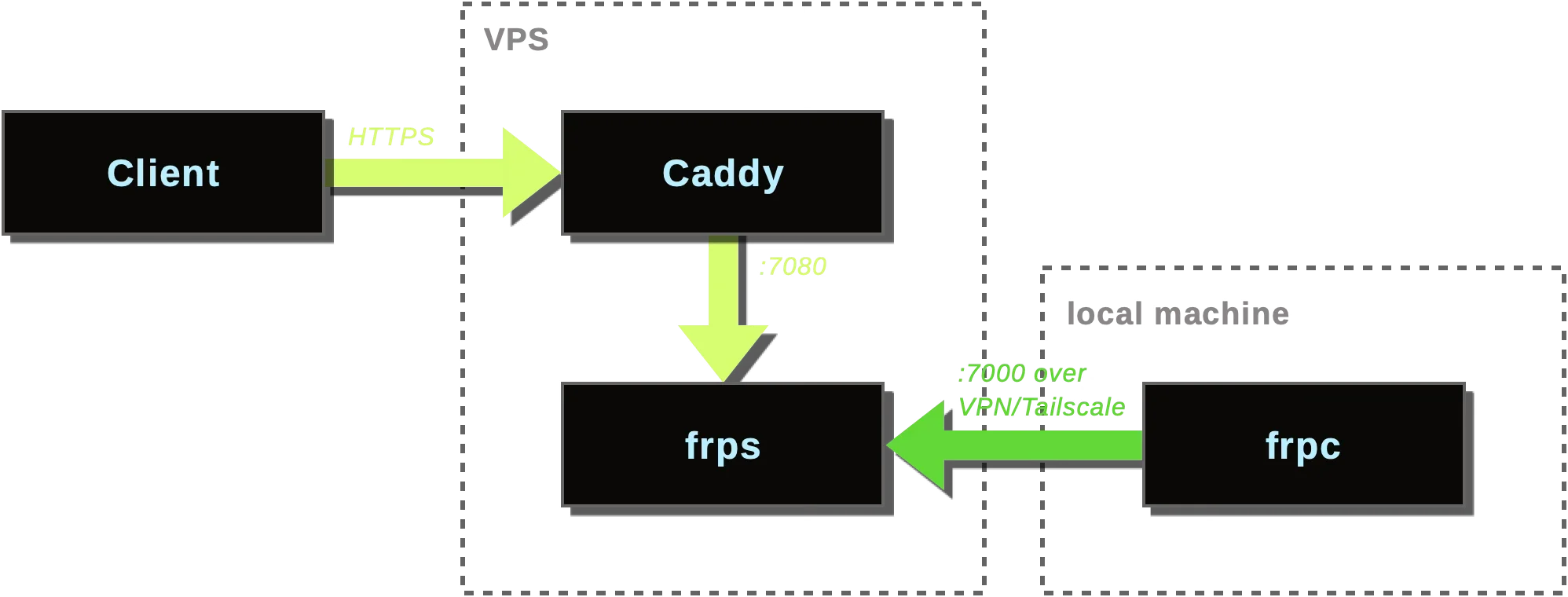
This setup involves:
- A VPS server with a public IP address to relay public traffic, Docker, and Caddy.
- A domain name with a wildcard DNS record pointing to the VPS server (e.g.
*.tunnels.domain.tld). - An encrypted connection between the local development machine and the VPS server using VPN (e.g. WireGuard or Tailscale).
Server setup
docker-compose.yml
services:
  frps:
    image: ghcr.io/fatedier/frps:v0.65.0
    restart: unless-stopped
    command: -c /frps.toml
    volumes:
      - ./frps.toml:/frps.toml:ro
    ports:
      - 100.100.100.99:7000:7000 # tunnel server port
      - 100.100.100.99:7500:7500 # web dashboard port
      - 127.0.0.1:7080:7080 # http vhost port
Replace:
100.100.100.99with your Tailscale or WireGuard VPN IP address, so that only clients connected to the VPN can access the frp server.
frps.toml
bindPort = 7000
vhostHTTPPort = 7080
subDomainHost = "tunnels.domain.tld"
webServer.addr = "0.0.0.0"
webServer.port = 7500
webServer.user = "admin"
webServer.password = "REPLACE_ME"
auth.method = "token"
auth.token = "REPLACE_ME"
Replace:
tunnels.domain.tldwith your domain name.REPLACE_MEwith a strong password and token.
Caddyfile
service1.tunnels.domain.tld {
  reverse_proxy localhost:7080
}
Replace:
service1.tunnels.domain.tldwith the desired subdomain for your local server.
Client setup
Install frpc on local development machine. For macOS with Homebrew:
brew install frpcfrpc.toml
Create frpc.toml in your project folder:
serverAddr = "{{ .Envs.FRP_SERVER_ADDR }}"
serverPort = 7000
auth.method = "token"
auth.token = "{{ .Envs.FRP_AUTH_TOKEN }}"

[[proxies]]
name = "service1"
type = "http"
localPort = 8080
subdomain = "service1"
Replace:
service1with the desired subdomain for your local server.8080with the port your local development server is running on.
Running the tunnel
I use fnox to encrypt my environment variables in a fnox.toml file. Then I run frpc with:
fnox exec -- frpc -c frpc.toml