Automatically saving Gmail messages to Google Drive using Google Apps Script
I want to automatically save receipts from my Gmail account to Google Drive as .eml files, so that I can do offline processing on it.
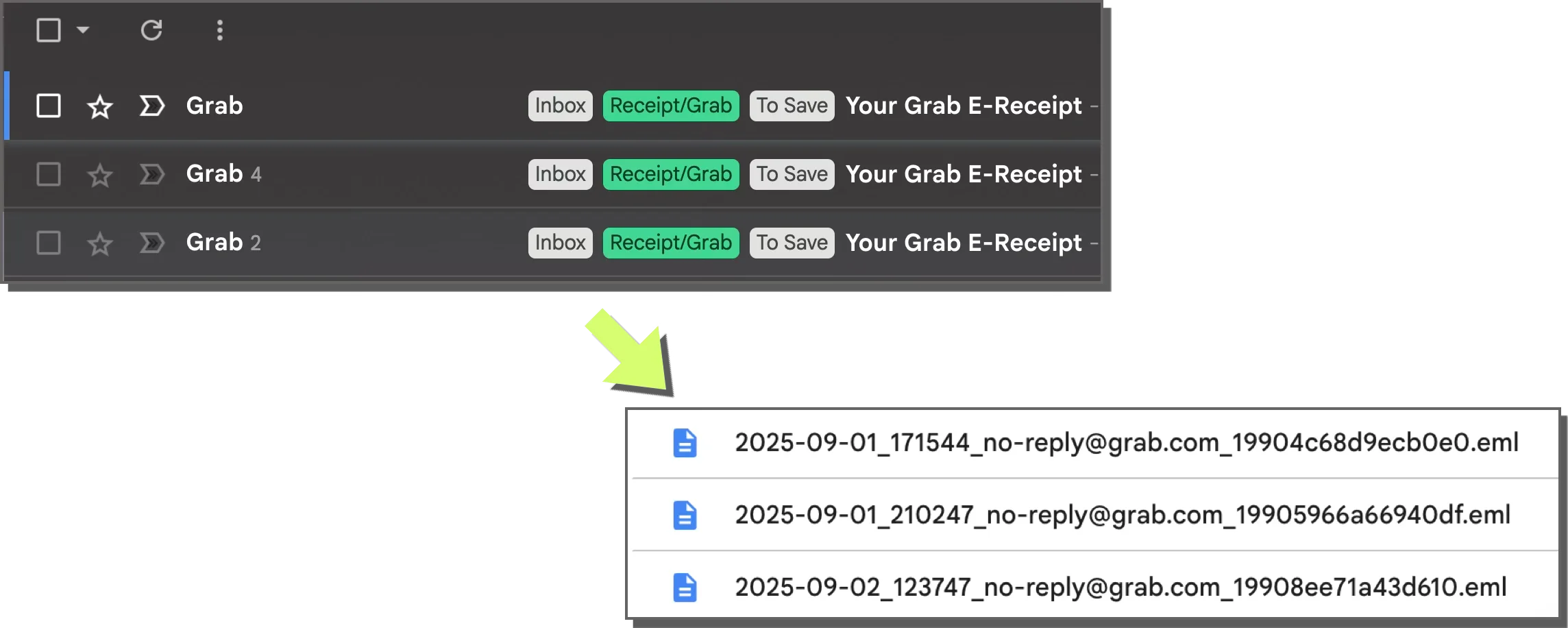
Once the files are in Google Drive, I can easily share the enclosing folder with a Google Cloud Service Account without having to grant my automation scripts and n8n workflows access to the whole inbox.
The mailparser library can parse .eml files, so I can extract data from the email content.
How it works
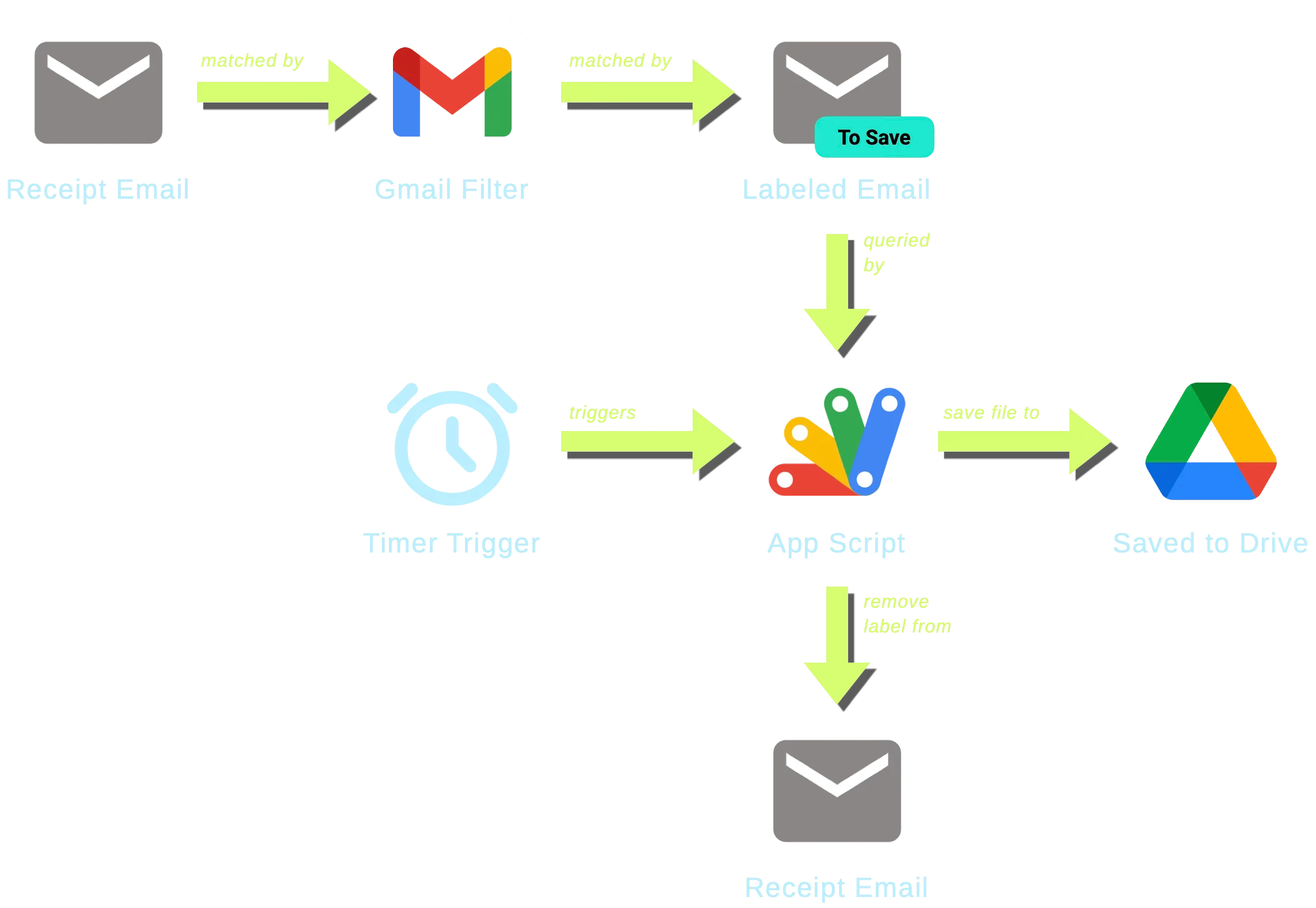
I set up a Gmail filter to label emails I want to save with a specific label (e.g., “To Save”).

I created a Google Apps Script that runs periodically (e.g. every 10 minutes) to:
- Search for emails with the specified label.
- Save each email as an
.emlfile to a designated folder in Google Drive. - Remove the label from the email after saving it to avoid duplicates.
The script
function saveEmailsToGoogleDrive() {
  var searchQuery = 'label:to-save'
  var baseFolder = DriveApp.getFolderById('REPLACE_ME_WITH_FOLDER_ID')
  var label = GmailApp.getUserLabelByName('To Save')
  var threads = GmailApp.search(searchQuery, 0, 50)
  threads.forEach(function (thread) {
    var messages = thread.getMessages()
    messages.forEach(function (message) {
      // Get date and format components
      var date = message.getDate()
      var year = Utilities.formatDate(date, Session.getScriptTimeZone(), 'yyyy')
      var yearMonth = Utilities.formatDate(
        date,
        Session.getScriptTimeZone(),
        'yyyy-MM'
      )
      var dateTime = Utilities.formatDate(
        date,
        Session.getScriptTimeZone(),
        'yyyy-MM-dd_HHmmss'
      )

      // Get message ID (remove < and > brackets)
      var messageId = message.getId()

      // Get sender email address
      var from = message.getFrom()
      // Extract just the email address from "Name <email@example.com>" format
      var emailMatch = from.match(/<(.+?)>/)
      var fromEmail = emailMatch ? emailMatch[1] : from
      // Sanitize email for filename
      fromEmail = fromEmail.replace(/[\/\\:*?"<>|]/g, '_')

      // Create filename
      var filename = dateTime + '_' + fromEmail + '_' + messageId + '.eml'

      // Get or create year folder (YYYY)
      var yearFolders = baseFolder.getFoldersByName(year)
      var yearFolder = yearFolders.hasNext()
        ? yearFolders.next()
        : baseFolder.createFolder(year)

      // Get or create month folder (YYYY-MM)
      var monthFolders = yearFolder.getFoldersByName(yearMonth)
      var monthFolder = monthFolders.hasNext()
        ? monthFolders.next()
        : yearFolder.createFolder(yearMonth)

      // Get raw email content
      var rawContent = message.getRawContent()

      // Save to Drive (check if file already exists to avoid duplicates)
      var existingFiles = monthFolder.getFilesByName(filename)
      if (!existingFiles.hasNext()) {
        monthFolder.createFile(filename, rawContent, MimeType.PLAIN_TEXT)
        Logger.log('Saved: ' + year + '/' + yearMonth + '/' + filename)
      } else {
        Logger.log('Skipped: ' + year + '/' + yearMonth + '/' + filename)
      }
    })
    thread.removeLabel(label)
  })
}
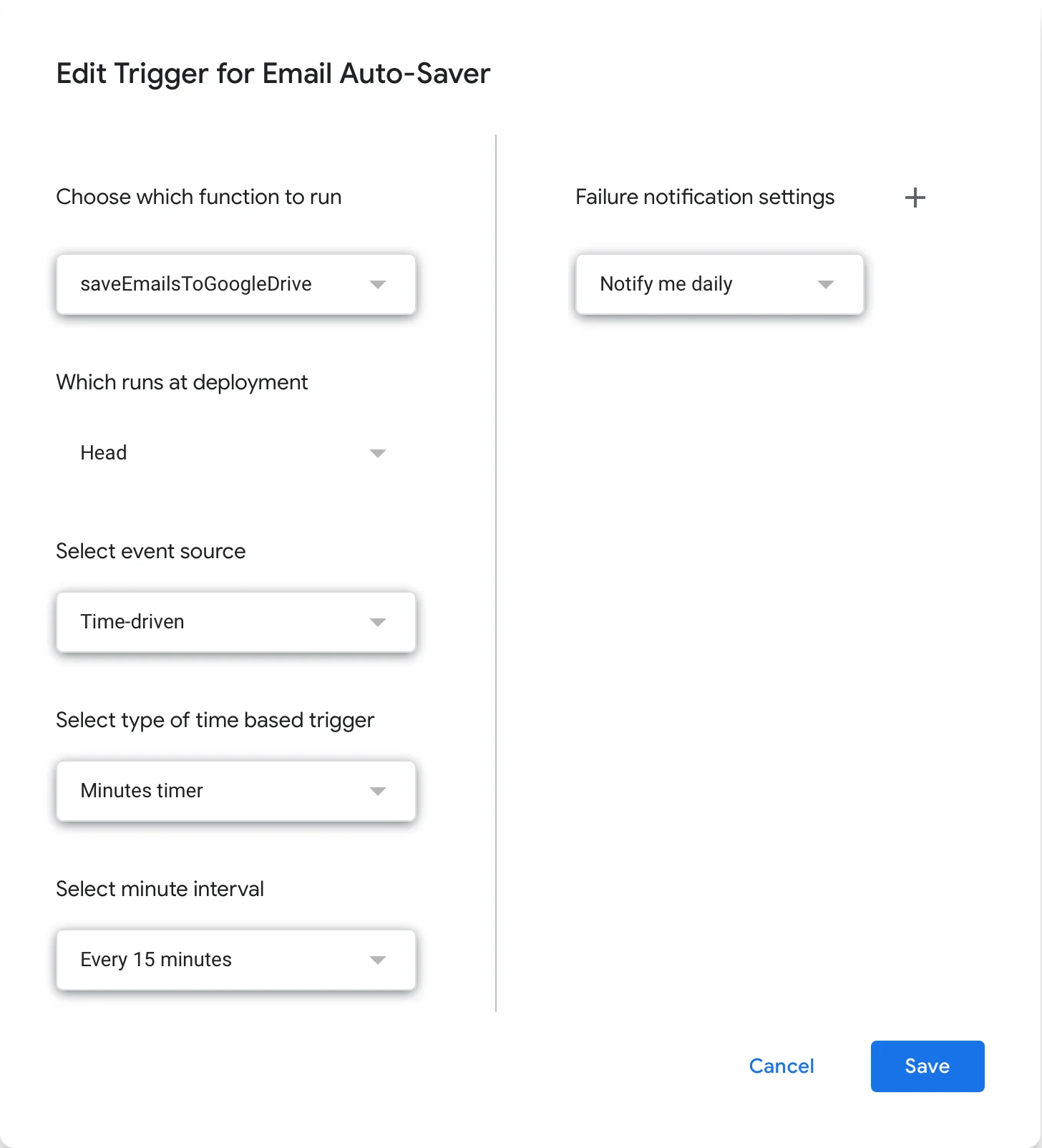
Here’s the trigger settings:
Example: Parsing GrabFood receipts
I asked Claude to use mailparser and cheerio to extract data from a GrabFood receipt email. Here’s what it came up with:
View code
import * as cheerio from 'cheerio'
import fs from 'fs/promises'
import { simpleParser } from 'mailparser'
async function readEmailFile(emlPath) {
const emlContent = await fs.readFile(emlPath, 'utf8')
const parsed = await simpleParser(emlContent)
return parsed
}
function parseGrabReceiptHtml(htmlContent) {
const $ = cheerio.load(htmlContent)
const result = {
service: null,
orderNumber: null,
dateTime: null,
merchant: null,
pickupLocation: null,
dropoffLocation: null,
paymentMethod: null,
items: [],
subtotal: null,
deliveryFee: null,
discounts: [],
total: null,
}
const allText = $('body').text()
// Service type
if (allText.includes('GrabFood')) {
result.service = 'GrabFood'
}
// Extract metadata from table cells
$('td').each((_i, elem) => {
const text = $(elem).text().trim()
if (text.includes('รหัสการจอง')) {
const spans = $(elem).find('span')
spans.each((_j, span) => {
const spanText = $(span).text().trim()
if (
spanText &&
!spanText.includes('รหัสการจอง') &&
spanText.length > 5
) {
result.orderNumber = spanText
}
})
}
if (text.includes('สถานที่เริ่มต้นการเดินทาง')) {
const spans = $(elem).find('span')
spans.each((_j, span) => {
const spanText = $(span).text().trim()
if (
spanText &&
!spanText.includes('สถานที่เริ่มต้นการเดินทาง') &&
spanText.length > 3
) {
result.pickupLocation = spanText
// Extract merchant name (text before dash)
const dashIndex = spanText.indexOf(' -')
if (dashIndex > 0) {
result.merchant = spanText.substring(0, dashIndex)
} else {
result.merchant = spanText
}
}
})
}
if (text.includes('สถานที่ปลายทาง')) {
const spans = $(elem).find('span')
spans.each((_j, span) => {
const spanText = $(span).text().trim()
if (
spanText &&
!spanText.includes('สถานที่ปลายทาง') &&
spanText.length > 2
) {
result.dropoffLocation = spanText
}
})
}
if (text.includes('รูปแบบการชำระเงิน')) {
const spans = $(elem).find('span')
spans.each((_j, span) => {
const spanText = $(span).text().trim()
if (
spanText &&
!spanText.includes('รูปแบบการชำระเงิน') &&
spanText.length > 3
) {
result.paymentMethod = spanText
}
})
}
})
// Extract date/time
const dateTimeMatch = allText.match(
/(\d{2}\s+\w+\s+\d{2}\s+\d{2}:\d{2}[^\n]*)/
)
if (dateTimeMatch) {
result.dateTime = dateTimeMatch[1].trim()
}
// Parse items and pricing from the receipt table
// Strategy: iterate through all <tr> rows and parse based on column structure
const allRows = $('tr').toArray()
for (let i = 0; i < allRows.length; i++) {
const $row = $(allRows[i])
const $tds = $row.find('td')
// Skip rows that don't have the expected 4-column structure
if ($tds.length !== 4) continue
const col1Text = $($tds[1]).text().trim()
const col2Text = $($tds[2]).text().trim()
// Check for item row: "1x Item Name" in col1, "฿ XXX" in col2
const itemMatch = col1Text.match(/^(\d+)x\s/)
if (itemMatch && col2Text.includes('฿') && !col2Text.startsWith('-')) {
const quantity = parseInt(itemMatch[1])
// Extract item name from bold span
const boldSpan = $($tds[1]).find("span[style*='font-weight:bold']")
const name = boldSpan.text().trim()
// Extract price
const priceMatch = col2Text.match(/฿\s*([\d,]+)/)
const price = priceMatch ? parseFloat(priceMatch[1].replace(/,/g, '')) : 0
const options = []
// Look ahead for option rows
let j = i + 1
while (j < allRows.length) {
const $nextRow = $(allRows[j])
const $nextTds = $nextRow.find('td')
if ($nextTds.length !== 4) break
const nextCol1Text = $($nextTds[1]).text().trim()
const nextCol2Text = $($nextTds[2]).text().trim()
const nextCol1Html = $($nextTds[1]).html()
// Check if this is an option row (indented, no price)
if (
nextCol1Html &&
nextCol1Html.includes(' ') &&
!nextCol2Text.includes('฿')
) {
// Extract option text (after the nbsp characters)
const optionSpans = $($nextTds[1]).find('span')
optionSpans.each((_k, span) => {
const spanText = $(span).text().trim()
if (spanText.length > 0 && spanText !== '') {
options.push(spanText)
}
})
j++
} else {
break
}
}
result.items.push({
quantity,
name,
options,
price,
})
}
// Check for subtotal row
else if (col1Text === 'ค่าอาหาร' && col2Text.includes('฿')) {
const subtotalMatch = col2Text.match(/฿\s*([\d,]+)/)
if (subtotalMatch) {
result.subtotal = parseFloat(subtotalMatch[1].replace(/,/g, ''))
}
}
// Check for delivery fee row
else if (col1Text === 'ค่าจัดส่ง' && col2Text.includes('฿')) {
const feeMatch = col2Text.match(/฿\s*([\d,]+)/)
if (feeMatch) {
result.deliveryFee = parseFloat(feeMatch[1].replace(/,/g, ''))
}
}
// Check for discount rows (any row with negative amount)
else if (col2Text.includes('-') && col2Text.includes('฿')) {
const discountMatch = col2Text.match(/-\s*฿\s*([\d,]+)/)
if (discountMatch && col1Text.length > 0) {
result.discounts.push({
description: col1Text,
amount: parseFloat(discountMatch[1].replace(/,/g, '')),
})
}
}
// Check for total row
else if (col1Text.includes('รวม') && col2Text.includes('฿')) {
const totalMatch = col2Text.match(/฿\s*([\d,]+)/)
if (totalMatch) {
result.total = parseFloat(totalMatch[1].replace(/,/g, ''))
}
}
}
return result
}
async function parseGrabEmail(emlPath) {
const parsed = await readEmailFile(emlPath)
// Debug mode: print raw HTML
if (process.env.DEBUG_HTML) {
console.log('=== RAW HTML ===')
console.log(parsed.html)
console.log('\n=== END HTML ===\n')
}
// Debug mode: print all text content
if (process.env.DEBUG_TEXT && parsed.html) {
const $ = cheerio.load(parsed.html)
console.log('=== ALL TEXT ===')
console.log($('body').text())
console.log('\n=== END TEXT ===\n')
}
const result = {
from: parsed.from?.text,
to: parsed.to?.text,
subject: parsed.subject,
date: parsed.date,
}
if (parsed.html) {
const receiptData = parseGrabReceiptHtml(parsed.html)
Object.assign(result, receiptData)
}
return result
}
const result = await parseGrabEmail(process.argv[2])
console.log(JSON.stringify(result, null, 2))I asked it to create a DEBUG_HTML flag to print the raw HTML content. This helped Claude to debug the HTML parsing logic on its own.
Once it all works I can run the resulting script like this:
node parse-email.mjs 'Your Grab E-Receipt.eml'Result (I’ve redacted some personal info):
{
"from": "\"Grab\" <no-reply@grab.com>",
"to": "_________@gmail.com",
"subject": "Your Grab E-Receipt",
"date": "2024-02-23T06:05:01.000Z",
"service": "GrabFood",
"orderNumber": "A-AAAAAAAAAAAA",
"dateTime": "23 Feb 24 12:34 +0700",
"merchant": "Peine Cafe and bistro",
"pickupLocation": "Peine Cafe and bistro -ถนนชัยพฤกษ์",
"dropoffLocation": "Soi Na Jom Tien 10, Na Chom Thian, Sattahip, Chon Buri, 20250, Thailand",
"paymentMethod": "Visa 9999",
"items": [
{
"quantity": 1,
"name": "Fried Potato with chorizo sausageand fried egg and Americano☕☕",
"options": [
"Iced Latte"
],
"price": 250
}
],
"subtotal": 250,
"deliveryFee": 25,
"discounts": [
{
"description": "[GrabFood ซูเปอร์คุ้ม แพ็กเกจ] 50%* off max. ฿100",
"amount": 100
},
{
"description": "Free deli ฿20 off, min spend ฿150 [Other cities*]",
"amount": 20
}
],
"total": 155
}