Custom Widget Access Tokens in Grist
When integrating with Grist, normally you would use an API key to authenticate with Grist API. However, it is long-lived and has a very broad scope: your API key provides access to everything you have access to, and each user can have only 1 API key, so rotating your API key breaks every integration that uses it.
- For self-hosters, you can create Service Accounts to represent a workload, but the tokens are still long-lived. Good for plugging into n8n.
- For users of hosted Grist and the full edition of Grist, there’s also OAuth Apps, where app developers can request fine-grained scopes and users can grant access to only some documents, but this is not part of Grist Community Edition.
There is yet another authentication mechanism available in all Grist editions, useful for granting temporary access to a single document: “Custom Widget Access Tokens”1.
Quick introduction + demo
A Custom Widget Access Token is a JWT generated by a custom widget, lasts for 15 minutes, scoped to the document that embeds the widget, and represents the user who uses the widget. It can be obtained by calling grist.docApi.getAccessToken from the custom widget. The token can then be used to call Grist API endpoints by passing it via the ?auth= query parameter (not Authorization header!).
I built a custom widget that lets you generate and inspect access tokens (open demo in Grist, source code):
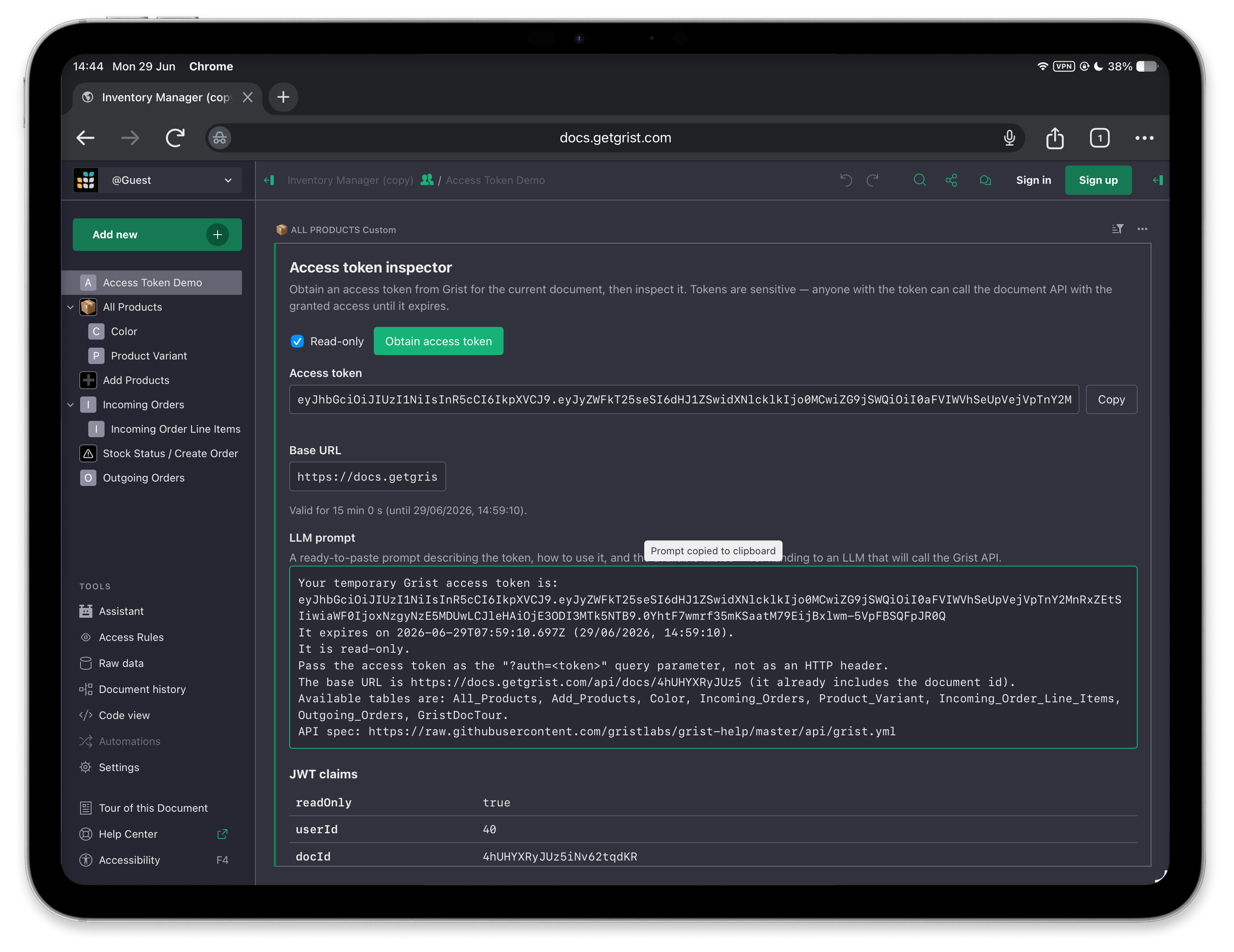
To use it in your own documents, use the following Custom Widget URL:
https://dtinth.github.io/grist-widget/access-token/Use cases
Giving AI agents temporary access to any Grist document
With this custom widget, you can copy the LLM prompt to your AI agent, to give it temporary access on any Grist document on any server, without having to manually manage API keys:
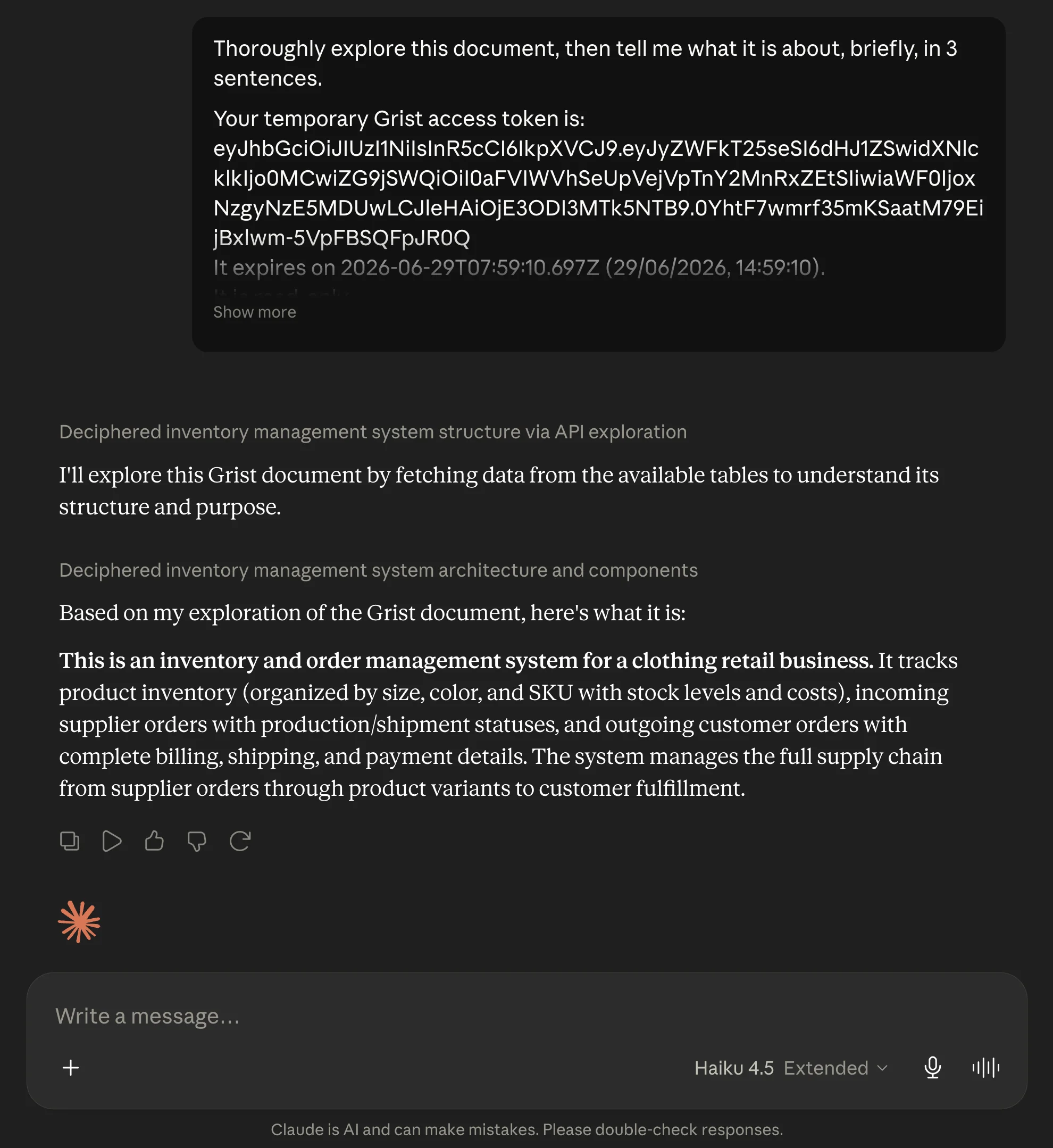
The access token is valid for 15 minutes, after which you must generate a new token and give it to the agent. Great for one-off tasks. If your agent has a network firewall, you must give them access to these domains:
| Domain | Reason |
|---|---|
docs.getgrist.com | To access the Grist API (or if self-hosted, replace with your instance domain) |
raw.githubusercontent.com | To access the API documentation |
Building a sync pipeline triggered from a Grist custom widget
If you're using Grist as a headless CMS or as document management system, you might want to build a user-triggered pipeline, such as:
- Generating PDFs and saving them to Google Drive
- Triggering GitHub Actions workflows
While you can use Webhooks or Workflow Automations to build this pipeline, you can also let user do it from a custom widget as well. Your custom widget would obtain an access token, and pass it to the backend. The backend should:
- Receive an access token from the custom widget
- Identify the user using GET /profile/user
- Check if user has access to the doc, e.g. by using GET /docs/{docId}/tables
- Perform the data synchronization
Displaying attachments in a Grist custom widget
Normally a custom widget receives the attachment's numeric ID. To display it in a custom widget, you would need to:
- Obtain an access token
- Construct an attachment download URL: GET /docs/{docId}/attachments/{attachmentId}/download with
?auth=query param appended - Use that URL to render an image element
For more information, see forum thread: Accessing attachments from Custom Widget builder
Other use cases
With an access token, your custom widget can do things beyond what its Plugin API normally provides, such as:
- Uploading attachments
- Querying a table with sorting and filtering (
grist.docApi.fetchTablefetches the whole table without any filtering) - Running SQL queries on the Grist document
JWT claims inside an access token
This is an implementation detail, only noted here for the curious. In practice, you should treat the token as an opaque string.
{
  "readOnly": true,
  "userId": 55576,
  "docId": "qNCfWjZErhkt74Rtn3CtXL",
  "iat": 1779978355,
  "exp": 1779979255
}
Footnotes
Not to be confused with OAuth Access Tokens which is a separate thing specific to the OAuth feature in Full Grist. ↩